
Combat the Cost of Groceries with a Plan
3 years ago


 So probably the most daunting part about transitioning to my new job is carving out a space that I can feel at home in and do my best work. I am anxious to get my move on so to speak, but due to the holiday - I kind of need to wait. In the meantime I have played around with some free floor planning software, which has a 3d tool so I can design what seems like a good plan and try to acclimatize myself through the virtual medium. I am pleased to discover based on the dimensions and my configuring that I can probably set up my office in such a way as to include both the gargantuous L shaped desk (that I think is probably stuck in the office for life) and my treadmill desk without it feeling too cramped. I am thinking of ways to insulate the undercarriage of my treadmill so that the person whose office is directly below mine and the one whose office is adjacent to mine won't be completely irritated and bothered by my quirky idiosyncrasies. I hope to have three distinct work spaces -- sit down desk, tread desk, and side table for working one-on-one with students. I am hoping that my arrival will model the myriad of environments that one can seamlessly work between.
 So here is my Treadmill Desk 3.0 - the model I will take to work and with which I will make all my co-workers jealous. It was easier than 1.0 or 2.0 (see earlier posts 9/29 & 10/13) due to the parallel-to-the-ground handlebars. I was able to easily bungee the white shelf board in place. I used an old over-the-sink shelf (clamped in place) and a piece of plexiglass to create a second floating shelf for my laptop. It is a smaller and much quieter unit than the 595le, so will fit better in to my expected use of it at work. In the interim (between now and when I return to work), I will use the ProForm 420. Hopefully my excitement about my new tread won't overshadow the great progress I continue to make - losing 10.5 lbs. and 8.5". I have updated my progress report in the right column and will add additional pictures tomorrow.
 So after a week of trying out my new ergonomically friendly set-up, I am pleased to report that the negative tilt keyboard has been a great addition. I left the mouse on the other section. Initially I thought that I might need to move it as well, due to pain throughout my middle deltoid. As it turns out, the pain was related to the flu shot I had received earlier in the week and has since resolved. I have a piece of plexiglass that fits over the cutout; so, when I return to work in January, I will be able to put the plexi down to then create a space for grading papers, etc.
 Alright here is an updated picture of my adjusted set up. I also want to reiterate that no money was spend for this set up. I had all this stuff lying around my house - scrap wood, unused wireless keyboard, shelf board, bungee cord, light, 2 sets of clamps. It is hard to tell from this picture but the keyboard is supported with a little ledge, which holds it in place at an incline and the little platform for the mouse creates a parallel-to-the-floor surface for easier mousing and less stress on my hand and wrist.
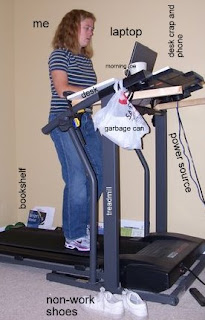 o here is my set-up. As you can see it has all the bells and whistles of a normal desk set up including bookshelf, desktop, garbage can, worker, etc. Additionally, I have two cup holders, which usually contain glasses of water, cups of coffee, or my phone. I fed the cords of my laptop through the bottom of the left cupholder. I have had no problems with the cords getting in my way. The ledge at the top, which I think is traditionally used for holding a book or something has become the catchall for desk junk -- headphones, cell phone, pens, post-it notes, and iPod. While I have ample space on top, I am working on several projects, so I have moved a good many books to the floor. I have been able to easily reach them without stopping.
+-+MSN+Health+%26+Fitness+282009+91404+PM.bmp.jpg)
