Showing posts with label ergonomics. Show all posts

An end to the discombobulation

Sunday, January 11, 2009
I will start this post by publicly admitting that B was not very excited about helping me move Treadmill Desk 3.0 to its new home in my new office at my new job. It was only after two days of talking about it, a several hours of reassurance that if my new boss thought it was a bad idea, I would move it home. I had, however, done my homework. I measured the space, I played with floor plans (see earlier posts), and I cleared it by the appropriate folks. Since our larger office must meet ADA minimum clearances, I knew I could get it from the car to the office. It cleared all thresholds without incident. After the 2nd picture, B left. I think he still isn't sure this is a great idea. So here is a commentary on the set up from left to right. I will also add my panoramic video to the column on the right.

1. Space
2. Wheeling Pro-Form in to position
3. Foam insulation to put between tread and floor (although I am lucky enough to have a storage room below me, rather than a person).
4. Treadmill mat over the top of the insulation to hold it in position and to provide further quieting.
5. Done -- this part took me a whopping 5 or so minutes (I have not counted the time to get it in the car, drive to work, get it in the building, up the elevator, etc.)
6. Another view of the treadmill desk workspace.


7. I then added a pre-cut 3' piece of shelf board.
8. It is held in place with three bungee cords.
9. Underneath view of the bungees.
10. I added a 3' long kitchen shelf (for traditional use above one's kitchen sink). It is clamped in place
11. A piece of plexiglass rests between the kitchen shelf and the front of the treadmill controls.
12. Another view of the plexi. I rest my laptop on the plexi and use a wireless keyboard and mouse on the shelf below. Ergonomically it works great.

So, as all can imagine, I am psyched to head to work tomorrow morning and jump on first thing to help get me focused for the day ahead.

Ergonomics Revisited

Wednesday, October 29, 2008
So after a week of trying out my new ergonomically friendly set-up, I am pleased to report that the negative tilt keyboard has been a great addition.  I left the mouse on the other section.  Initially I thought that I might need to move it as well, due to pain throughout my middle deltoid.  As it turns out, the pain was related to the flu shot I had received earlier in the week and has since resolved.  I have a piece of plexiglass that fits over the cutout; so, when I return to work in January, I will be able to put the plexi down to then create a space for grading papers, etc.

More on ergonomics

Wednesday, October 22, 2008
I'm back to the drawing board, literally, in that I am once again working out the bugs as I work toward perfect 'puter gadget positioning for someone of my height - 64".  While I have been able to find many sites about the best ergonomical positions for sitting posture, diagrams illustrating good standing desk posture are a bit more illusive.  I did find an excellent website at Cornell University that guides you through proper positioning.  I figure the only difference is what is happening below my waist.  So I am experimenting with a floating negative tilt keyboard tray.  I have attached it to the bottom of my lower desk section with four little ropes that I can adjust until I find the perfect height.  I still have my mouse on the main desk, but will play around with whether it needs adjusting as well.  Right now the keyboard is not actually visible, as it sits below the desk, but I think with a cutout and a plexiglass overlay (yep - I actually have spare plexiglass laying about from a craft project from a few years back) it will all work seamlessly.  This new design also allows me to postion my mouse just about anywhere - including dead center of the keyboard.  I read on the Cornell site that the closer to your midline the better and the more akin to normal hand carrying angle the better, so I have wedged the mouse pad so that my hand rest on the mouse just as it would without the mouse.  I am going to try this new design for a few days and then I will report how it is going.

Treadmill Desk Set-Up 2.0

Monday, October 13, 2008
Alright here is an updated picture of my adjusted set up. I also want to reiterate that no money was spend for this set up. I had all this stuff lying around my house - scrap wood, unused wireless keyboard, shelf board, bungee cord, light, 2 sets of clamps. It is hard to tell from this picture but the keyboard is supported with a little ledge, which holds it in place at an incline and the little platform for the mouse creates a parallel-to-the-floor surface for easier mousing and less stress on my hand and wrist.
Posted by Picasa

Ergonomics

After posting my treadmill desk pictures on the Office Walkers site, I noticed several posts indicating that it would be best to have a monitor that is separate from your computer (particularly if you are using a laptop) so that your screen is at the appropriate ergonomic eye level.  So adjusted my shelf boards a bit so that my laptop is on a shelf clamped to the top of my treadmill.  I hooked up a spare wireless keyboard that I had lying around and it rests on the lower shelf.  So far, so good -- no neck pain, eye strain, or anything else.  I still need to create a better place for my mouse to rest.  The keyboard is on a bit of an incline, which works great -- but I think I need a more level surface for my mouse.

My Office

Friday, October 10, 2008
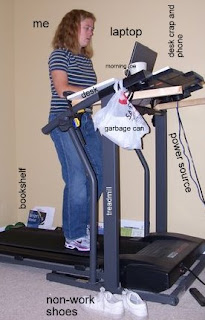
So here is my set-up.  As you can see it has all the bells and whistles of a normal desk set up including bookshelf, desktop, garbage can, worker, etc.  Additionally, I have two cup holders, which usually contain glasses of water, cups of coffee, or my phone.    I fed the cords of my laptop through the bottom of the left cupholder.  I have had no problems with the cords getting in my way. The ledge at the top, which I think is traditionally used for holding a book or something has become the catchall for desk junk -- headphones, cell phone, pens, post-it notes, and iPod.  While I have ample space on top, I am working on several projects, so I have moved a good many books to the floor.  I have been able to easily reach them without stopping.Posted by Picasa